

TapeStopper: Free Tape Stop Plugin with Built-In Sequencer

Dead Channel Audio has introduced TapeStopper, a portable free tape stop plugin designed to deliver classic vinyl brake drops, spin-up transitions, and rhythmic pitch drops. The effect is available as a portable Windows 64-bit VST3 plugin that requires no registration, installer, or account sign-up to use.
Automated Pitch Halts and Step Sequencing
While traditional tape stop effects rely entirely on manual automation curves inside your DAW, TapeStopper adds an integrated trigger sequencer directly into the interface. This onboard sequencer lets producers program automated stutter patterns, tempo-synced cutoffs, and rhythmic drops across bars without drawing complex parameter automation lanes.
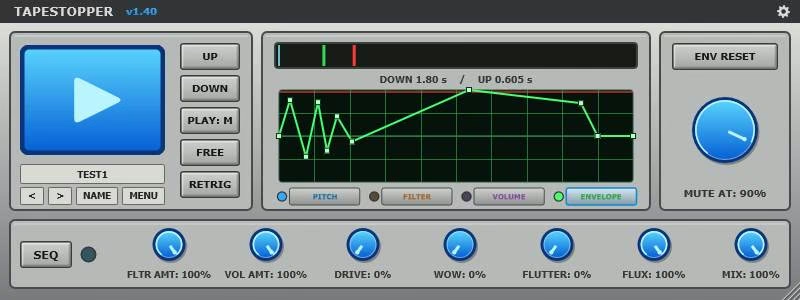
The plugin provides independently timed UP and DOWN stages, allowing you to tailor distinct curves for sudden spin-downs and gradual spin-ups. You can shape the inertia, transition speed, and brake duration to emulate worn magnetic tape heads, DJ turntable power cuts, or hyper-modern EDM drops.
Specifications and System Requirements
TapeStopper comes packaged as a portable dynamic library, making it lightweight and easy to deploy across secondary machines or portable production drives.
- Platform: Windows 10 / Windows 11 (64-bit only)
- Plugin Format: VST3
- Licensing: Freeware (100% free for commercial and personal use)
- Installation: Portable copy-and-paste into your common VST3 directory
- Controls: Independent Up/Down time knobs, curve shaping, trigger sequencer, and wet/dry mix
TapeStopper provides an intuitive, zero-cost solution for producers seeking authentic pitch deceleration and stutter effects in modern electronic arrangements. You can download the portable VST3 file directly from the Dead Channel Audio store page.
FAQ
Is TapeStopper really free?
TapeStopper is completely free to download and use with no hidden subscription fees, watermark restrictions, or mandatory user accounts.
Does TapeStopper work on macOS?
TapeStopper is currently a Windows-only 64-bit VST3 release, with no native macOS or AU builds available at this time.
How do you install TapeStopper?
Extract the downloaded archive and drop the TapeStopper.vst3 file directly into your standard Windows VST3 folder (C:\Program Files\Common Files\VST3).